
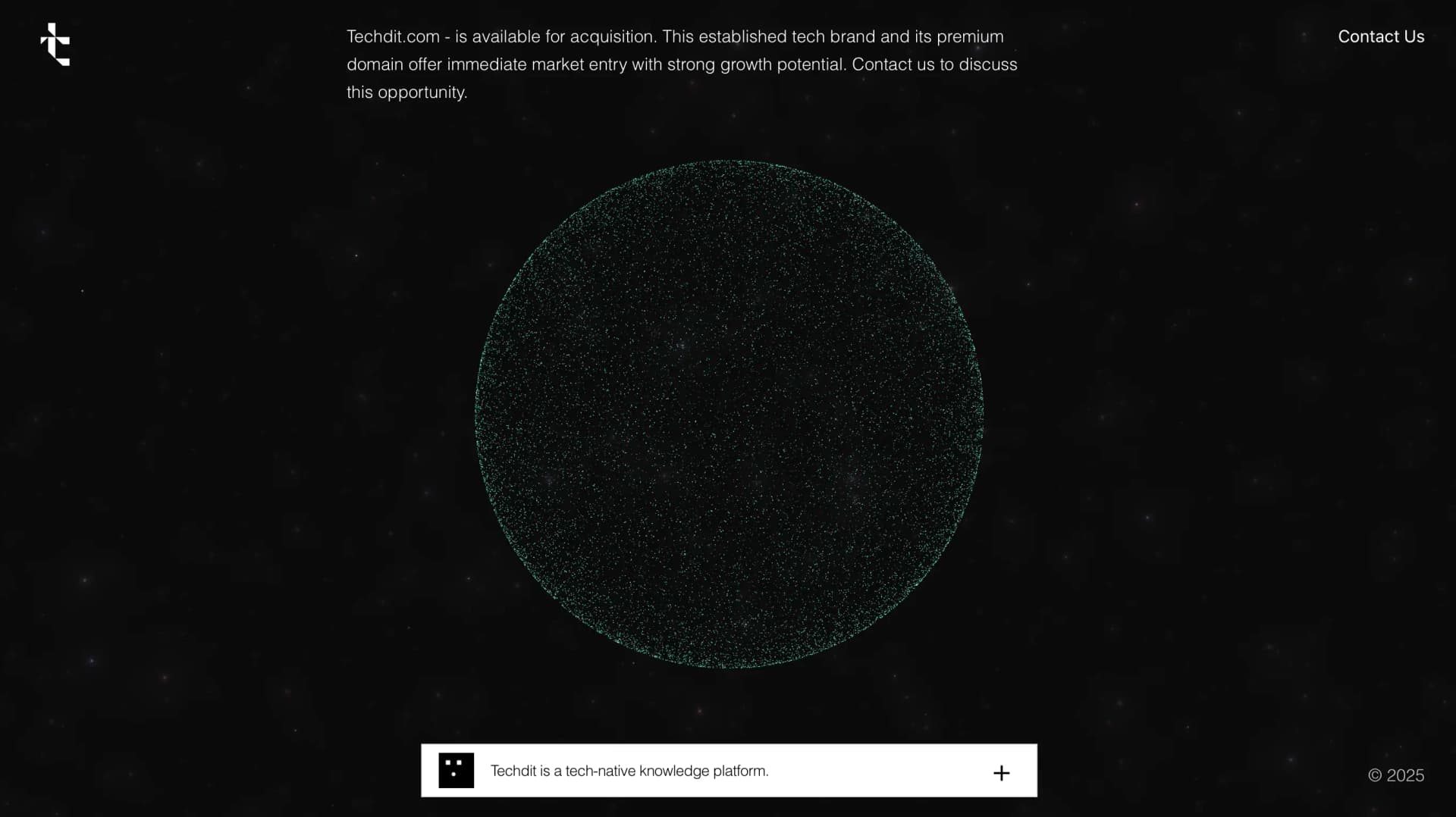
Most portfolios these days scream for your attention. Techdit.com does the opposite—it whispers. You land on the page and there it is: a sphere made of 20,000 cyan particles, slowly rotating in space. Move your cursor, and they scatter like startled fish. It's quiet, elegant, and impossible to ignore.
Why Particles?
I've always believed that the best interfaces don't just show what you can do they make you feel it. When I set out to build this portfolio, I wanted something that embodied "tech-native knowledge" without the usual noise. No flashy hero videos. No scroll-jacking. Just pure interaction.
The particle sphere became that centerpiece. It's a simple idea: position 20,000 points in 3D space, make them respond to the mouse, and let physics do the rest. But getting it to feel right took weeks of tuning.
Building the Sphere
The core is straightforward—Three.js via React Three Fiber. Each particle gets placed using spherical coordinates, which sounds fancy but really just means "distribute points evenly on a ball."
const particleCount = 20000;
const radius = 3.2 * responsiveScale;

for (let i = 0; i < particleCount; i++) {
  const phi = Math.acos(2 * Math.random() - 1);
  const theta = Math.random() * Math.PI * 2;

  const x = radius * Math.sin(phi) * Math.cos(theta);
  const y = radius * Math.sin(phi) * Math.sin(theta);
  const z = radius * Math.cos(phi);
}
The math ensures no clumping, no bald spots—just a perfect sphere. On screen, it looks almost surreal.
One Color, Infinite Motion
I made a deliberate choice early on: stick to one color. Cyan (#91eddc). No gradients, no rainbow effects, no color cycling. Just cyan.
// Every particle is exactly this color
colors[i * 3] = 0.57;     // Red
colors[i * 3 + 1] = 0.93;  // Green
colors[i * 3 + 2] = 0.86;  // Blue
Sounds limiting, right? But constraints force creativity. Instead of relying on color for visual interest, we leaned into motion. The particles glow through additive blending, creating that neon-in-space look that feels both retro and futuristic.
Making It Interactive
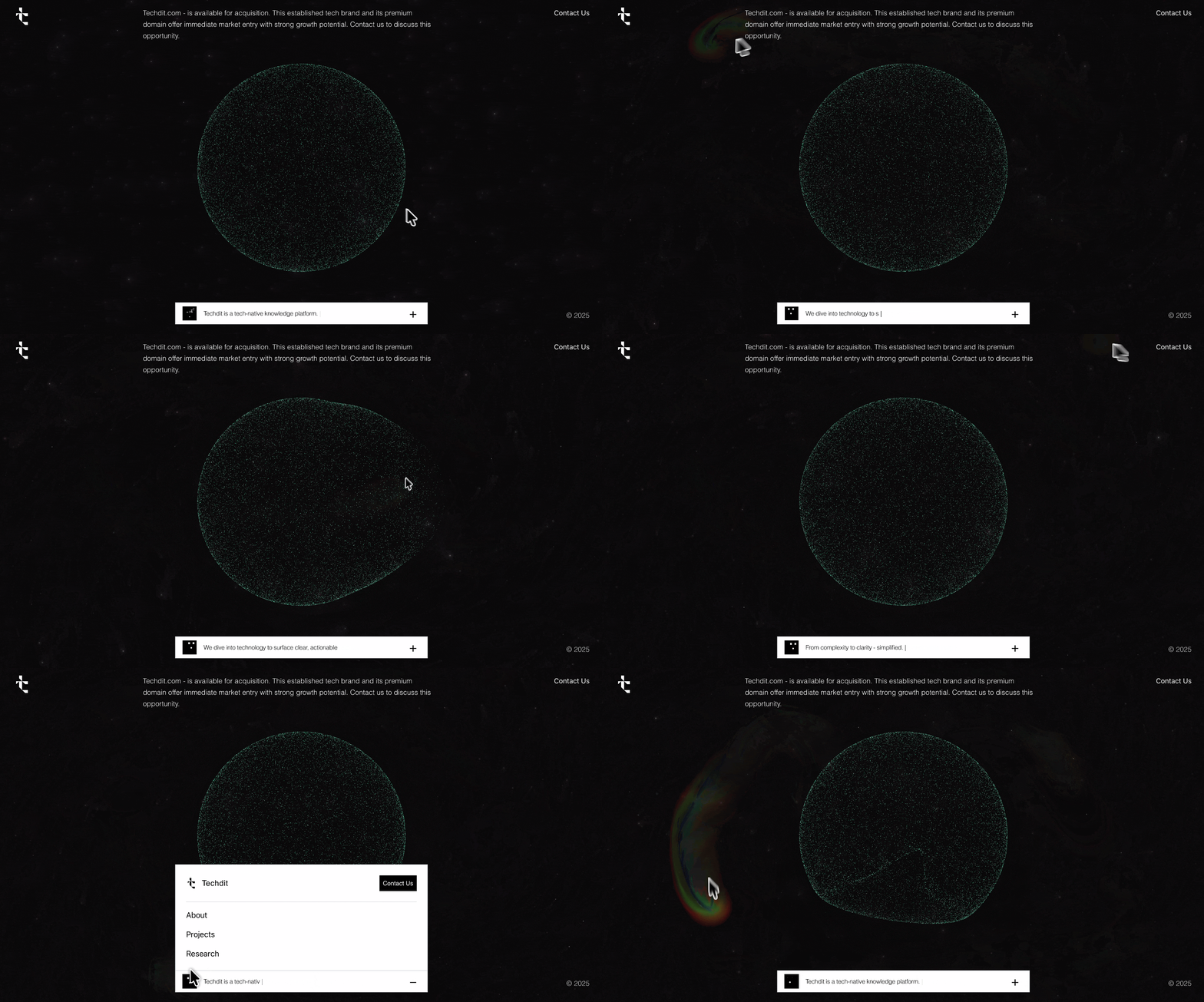
Here's where it gets fun. When you move your mouse over the sphere, particles don't just highlight, they flee. I use a raycaster to project your 2D cursor into 3D space, then calculate which particles are nearby.
const mouseRay = raycaster.ray;
const mouseWorldPos = mouseRay.origin.clone().add(
  mouseRay.direction.clone().multiplyScalar(7)
);

const effectRadius = 3.0;
const maxForce = 2.5;
Particles within range get pushed away. The force drops off smoothly with distance, so you get this natural ripple effect spreading through the sphere. It's weirdly satisfying like poking a cloud.
Spring Physics: The Secret Sauce
The real magic happens when particles return. I don't just snap them back to their original positions. Instead, each one uses spring physics to ease home.
const springForce = 0.45;
const dampening = 0.5;

const deltaX = data.originalPositions[i3] - newX;
data.velocities[i3] += deltaX * springForce;
data.velocities[i3] *= dampening;
Think of it like a rubber band. Pull a particle away, release it, and it bounces back with realistic momentum. Too much spring and it's jittery. Too little and it feels dead.
Sparkle and Shine
Even when you're not touching it, the sphere isn't static. Each particle flickers at its own rate, like stars twinkling in space.
const flickerSpeed = 0.5 + (flickerSeed % 30);
const flicker = Math.abs(Math.sin(time * flickerSpeed + flickerSeed)) * 0.8 + 0.01;

colorAttribute.setXYZ(
  i,
  baseR * flicker,
  baseG * flicker,
  baseB * flicker
);
Every particle has a unique flicker seed, so the patterns never repeat. It's a small detail, but these micro-animations are what make the difference between "cool demo" and "feels alive."
The Supporting Elements
The particle sphere is the star, but it needs a stage. Behind it sits a subtle galaxy effect—just enough twinkling stars to add depth without stealing focus. We kept the opacity low and the animation gentle.
The UI follows the same minimal approach. Clean typography (Rand at 300 weight), lots of breathing room, and a floating navigation bar at the bottom. That bar has my favorite detail: animated eyes that follow your cursor. It's silly and delightful, a reminder that not everything needs to be serious.
What People Do
The user journey is simple: you see the sphere, you move your mouse, particles scatter. No tutorial, no onboarding. The interaction is so natural that people just... get it.
Most visitors spend a solid 30 seconds just playing with it. Moving the cursor in circles, creating patterns, watching particles bounce back. That's the goal—not to explain the tech, but to create a moment of wonder.
Tech Stack
- React + TypeScript
- Three.js via React Three Fiber
- GSAP for UI transitions
- Tailwind CSS
- Rand font family
Nothing exotic. Just solid tools used well.
Final Thoughts
In a web full of noise, Techdit.com tries to create a moment of calm. 20,000 particles, one color, thoughtful physics. Nothing more than it needs to be.
The best feedback I've got isn't "cool effect" or "nice code." It's when someone says they kept the tab open just to play with it. That's when you know you've made something that resonates.
If you're building something similar, here's my advice: start with feeling, not features. What do you want people to experience? Then build toward that feeling. The tech is just how you get there.
Visit Techdit.com to try it yourself.